Monthly Archives: May 2016

Overview of PHP with simple example

Hi all,
Today we discuss PHP based topic like What is PHP, Why PHP, Difference between scripting languages and other language, What is a scripting language?, PHP Market share and usage and simple example.PHP is a Hypertext pre-processor. It’s a most popular scripting language on the web. It is widely used in open source source general-purpose scripting language and server side scripting language.


What is a scripting language?

A script is interpreted at runtime and it’s a set of programming instructions. The purpose of the scripts is it’s usually to enhance the performance or perform routine tasks for an application. Scripts are usually embedded into other software environments. The client side scripts are interpreted by the client application and the server side scripts are interpreted on the server. PHP is a server side scripting language so we can say that, it’s interpreted on the server. The best example of a client side script is JavaScript that is interpreted on the client browser. Both Javascript and PHP can be embedded into HTML pages.

Difference between scripting languages and other languages


Programming language Scripting language
Has all the features needed to develop complete applications. Mostly used for routine tasks
Programmed languages are compiled into a more compact form that does not need to be interpreted by another application in the same way. The compiled result is stand-alone. Scripted languages are interpreted within another program . Eg: JavaScript is put within HTML and then interpreted by the browser.
The code has to be compiled before it can be executed The code is usually executed without compiling
Programming languages may have more traditional structures and more concerns to address. Scripted languages may tend to be easier to learn, and can take less code to get something done.
Does not need to be embedded into other languages Is usually embedded into other software environments.
Programming languages on compilation make binaries The scripting language does not create any binary files (executables) and no memory will be allocated.

What is PHP

PHP is a server side scripting language and it’s mainly used for web application.

  • Server side scripting language
  • Free/ Open Source
  • Hypertext Preprocessor
  • Web Applications Development

It is a general purpose server side scripting language that is used to develop:

  • Web applications
  • Dynamic websites
  • Static websites

The client computers accessing the PHP scripts require a web browser only. A PHP file contains PHP tags and ends with the extension “.php”. The diagram below shows how a PHP file looks like.


The flowchart diagram shown below illustrates the basic architecture of a PHP web application and how the server handles the requests.
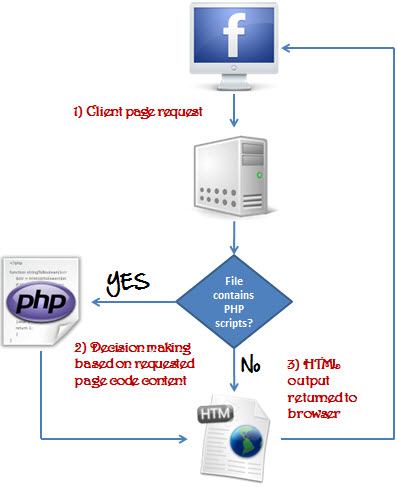
php_app_flowchart


Why PHP?

  1. PHP is open source and free.
  2. PHP is regular updated to keep abreast with the latest technology trends.
  3. Large community document
  4. PHP is cross platform
  5. Short learning curve compared to other languages such as JSP, ASP etc.
  6. Most web hosting servers support PHP by default unlike other languages such as ASP that need IIS. This makes PHP a cost effective choice.
  7. PHP has in built support for working hand in hand with MySQL; this doesn’t mean you can’t use PHP with other database management systems. You can still use PHP with
    • Oracle
    • Postgres
    • ODBC
    • MS SQL Server

PHP Market share and usage

There are over 20 million websites and web application on the internet developed using PHP scripting language. PHP is very simple easy to understand and very helps to develope web applications.
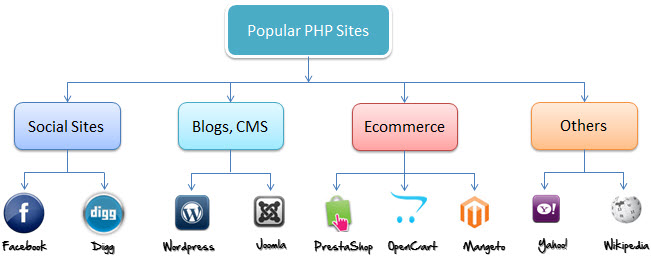


popular_php_sites

Benefits of PHP

  • PHP is an open source software
  • It’s a free software. Free to download and use.
  • The PHP script execute on server. Because it’s a server side scripting language.
  • It runs on various platform like windows,linux,mac etc.
  • Italso support wide range of database

PHP Files

The PHP file save with .php extension. Older PHP file extensions include

  • .phtml
  • .phps
  • .php3
  • .php5
  • .php4

PHP was designed to work with HTML, and as such, it can be embedded into the HTML code.


You can create PHP files without any html tags and that is called Pure PHP file. Using

First PHP Program

The program shown below is a basic PHP application that outputs the words “Welcome to PHP”

Code:


If anyone has doubts on this topic then please do let me know by leaving comments or send me an email.

Difference Between Left Join and Inner Join

Hi all,
What’s is the bifference betweeen left join and inner join. In this tutorial I will explain inner join and left join.First we discuss why we use join or what are the purpose of join in MYSQL.

Why we use Join ?

The main purpose of SQL joins are, it is used for combine two or more table based on common field cinditions.
In other words, if you want to retrieve data for more than one tables in that case we need to use join.

Now let’s check the difference between inner join and left join.

Difference Between Left Join and Inner Join

To understand the concept of left join and inner join, create two tables Employee1 and Employee2. Insert some values.

	create table Employee1 (
	EMPLOYEE_ID int(10) NOT NULL AUTO_INCREMENT,
	EMPLOYEE_NAME varchar(200),
	PRIMARY KEY(EMPLOYEE_ID)
	);
	
	insert into Employee1 (EMPLOYEE_ID,EMPLOYEE_NAME) values(1,'Jose');
	insert into Employee1 (EMPLOYEE_ID,EMPLOYEE_NAME) values(1,'Thomas');
	insert into Employee1 (EMPLOYEE_ID,EMPLOYEE_NAME) values(1,'Joseph');
	
	+-----------+-----------------+
	 EMPLOYEE_ID| EMPLOYEE_NAME   | 
	+-----------+-----------------+
	|   1       | Jose            | 
        |   2       | Thomas          |
	|   3       | Joseph          |
	+-----------+-----------------+

Create second table Employee2

	create table Employee2(
	EMPLOYEE_ID	int(10) NOT NULL AUTO_INCREMENT,
	SALARY varchar(100),
	PRIMARY KEY(EMPLOYEE_ID)
	);
	insert into Employee2(EMPLOYEE_ID, SALARY) values(1	,4000);
	insert into Employee2(EMPLOYEE_ID, SALARY) values(2	,8000);
	+-----------+----------+
	 EMPLOYEE_ID| SALARY   | 
	+-----------+----------+
	|	1   | 4000     | 
        |       2   | 8000     |
	+-----------+----------+

Now both Employee1 and Employee2 the tables are created.

Inner Join

sql-inner-join-query (1)

The INNER JOIN selects all rows from both tablesresults based on the match between the columns in both tables. Returns all the rows when there is atleast one matches in both tables.

inner_join

Inner JOIN query will be,

SELECT * from Employee1, Employee2 where Employee1.Employee_ID = Employee2.Employee_ID;

The result will be

Employee_ID Employee_Name Employee_ID Salary
1 Jose 1 4000
2 Thomas 2 8000

Left Join

left_join

LEFT JOIN query will be,


SELECT Employee_ID, Employee_Name,Salary
FROM Employee1
LEFT JOIN Employee2
ON Employee1.Employee_ID = Employee2.Employee_ID;

The result will be

Employee_ID Employee_Name Salary
1 Jose 4000
2 Thomas 8000
3 Joseph NULL

The LEFT JOIN keyword returns all rows from the left table (Employee1), with the matching rows in the right table (Employee2).

If anyone has doubts on this topic then please do let me know by leaving comments or send me an email.

Overview of Database Management System

Hi all,
Today we discuss related to database management system including advantages of DBMS, disadvantages of DBMS, Components of database system, Applications of DBMS and Characteristics of DBMS.


Database is a collection of related data. Any pices of information can be a data. A large and persistent collection of (more-or-less similar) pieces of information organized in a way that facilitates efficient retrieval and modification.

Database management System is collection of data and set of programs to access the data. It allows creation, manipulationand definition of database.

Components of Database System

component-of-database


  • Users : Users may be of various type such as System developer ,DB administrator and End users.
  • Database application : Database application may be Personal, Enterprise Departmental and Internal.
  • DBMS : Software that allow users to create,define and manages database access.
  • Database : Collection of logical data.

Applications of DBMS

  • Banking: Banks uses database for customer accounts, details, loans and other transactions.
  • Education : Colleges, schools and universities use database for course details , examination details ,registration: ,result.
  • Airlines: Airlines uses online database for reservation,departure of the planes and arrival ,schedule information.
  • Credit card transactions: It is used to keep track of purchases on credit cards to generate statements.
  • E-commerce: It uses online databases for buying and selling of products, internet marketing, online transaction processing.


  • Telecommunications: Telecommunication department uses database to store information related to details of calls, telephone numbers, generating bills
  • Human resources:

Advantages of DBMS

  • Controlling Data Redundancy: If database have more than one records of same type then it is called data redundancy.
  • Data Shairing: Data can be shared by authorized users of the organization among multiple users.
  • Data Security: Data security is the protection of the database from unauthorized access.
  • Enforcing Data Integrity: Data integrity is much easier
  • Ease of application development: he programmer needs to develop applications according to user specification.
  • Multiple user interfaces: DBMS provides different types of user interfaces.
  • Reduced Maintenance: It can be easily maintainable due to centralized nature of the system.
  • Data Independence: Keeps data separated from all programs that make use of it


  • Backup and recovery
  • Minimal data duplicacy.
  • Easy retrieval of data.
  • Reduced development time and maintainance need.

Disadvantages of DBMS

  • Complexity
  • Cost of Data Conversion
  • Costly
  • Higher impact of failure
  • Large in size
  • Database system creates additional complexity and requirements.

Characteristics of DBMS

  • It reduces complex relationships between data.
  • It provides different interfaces which user can manipulate the data.
  • Enforces user defined rules and ensures data sharing.


  • It has automatic backup and recovery procedures.
  • Integrated database helps in understanding relationship between data stored in different applications.
  • Changes made in the database schema should not affect the other levels.
  • Provides clear and logical view of process that manipulates data.
  • It contains ACID properties which stands for Atomicity, Consistency, Isolation and Durability which maintains data in healthy state in case of failure.
  • Controls data redundancy and control over security.

If anyone has doubts on this topic then please do let me know by leaving comments or send me an email.

WordPress Database Backup Manually

Hi all,
The wordpress database backup manually without using wordpress plugin is very simple, easy to undestand and useful to web developers. Do you want know how to develope or making this operation? .


Knowing the manual method allows you to quickly create a database backup whenever you need it. In here, show you how to make a WordPress database backup manually without using any plugins.

Why Is Backing up WordPress Important?

Before moving to wordpress database backup manually first discuss why wordpress backup is important.


Backing up your website allows you to retrieve a working version if something goes wrong or something is done that breaks it.
Several things can break a website:an external attack, a server crash, an error happening during an update, or even human error.
This is actually independent of your choice of using WordPress – whatever your website is built with, you should always have regular backups.

In fact, if a problem occurs, with backups, you can restore the altered files and data. Depending on how often you back up, you can even retrieve your whole website, without losing anything.

Backing Up WordPress Database Manually Using phpMyAdmin

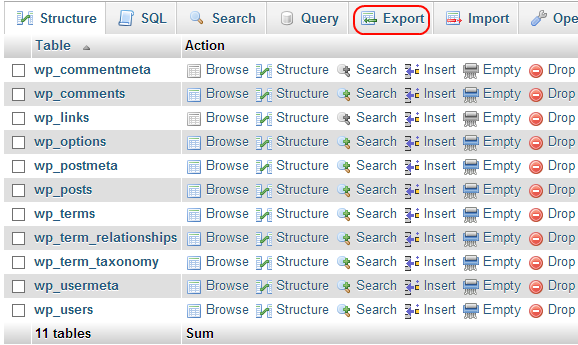
The phpMyAdmin helps to manipulate your database. The standard wordpress database contain 11 tables. And you can notice that, all of the wordpress database table contain wp_ prefix. The wordpress database tables are:


  1. wp_commentmeta
  2. wp_comments
  3. wp_links
  4. wp_usermeta
  5. wp__users

Step 1: Once logged in to phpMyAdmin, select the WordPress database by clicking on it

phpmyadmin


Step 2: Once your database is selected, click on Export link from the top menu bar.

WordPress-database-tables-list-page-and-options


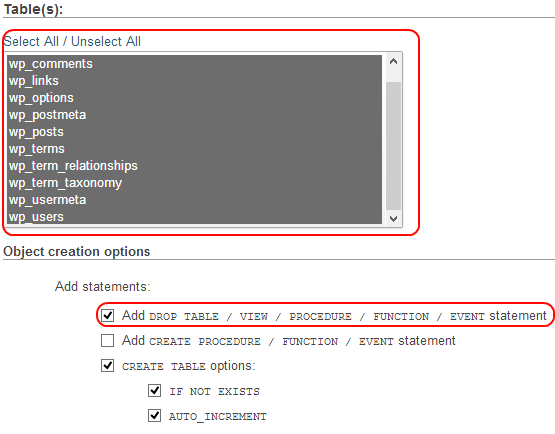
Step 3: From the Export options page, select Custom Export and ensure that:

  • All tables are highlighted, as seen in the below screenshot
  • The option Add Drop…. from the Object Creation options is enabled. This is useful for when you are restoring the WordPress database onto an existing one.

MySQL-WordPress-database-custom-export-options


Backup your WordPress database from CPanel

Step1: Login to your hosting provider CPanel and click on the Backup icon in the Files section.

Step2: Once in the backup options page, click on the WordPress database name listed under the section ‘Download a MySQL Database backup’.


Step3: Once you click on the WordPress database name, a compressed SQL script file is automatically downloaded to your computer.

If anyone has doubts on this topic then please do let me know by leaving comments or send me an email.

How to Install a WordPress Theme

Hi all,
Here I provide detailed step by step instructions on how to install and activate themes in your WordPress site. Installing wordpress theme is very easy and simple. If you activate the new theme then your site will automatically change looks and functions.


Install a Theme using WordPress Admin Theme Search

You can install free wordpress theme from WordPress.org themes directory. The easiest way is by using the WordPress admin theme search functionality.

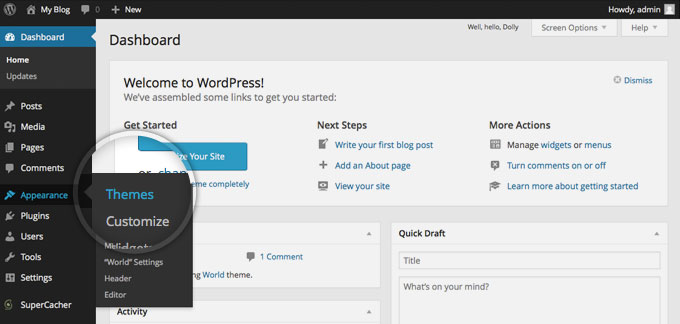
The first thing you need to do when you want to install a new WordPress theme is to login to your site admin page. Once there, go to Appearance -> Themes.

wordpress_theme1


Here, you will see all the themes you have currently installed in your application. To add another one, simply click on the Install Themes tab.

wordpress_theme2


In here, there are two methods are available to add new theme into our blog site. You can either use the the search field or you can upload the theme from your local hard drive.

Choose and Install a theme from the official WordPress theme directory

Installa theme from the official wordpress theme directory is the very easy method. This allows you to search for the theme you need directly from your site admin page.
Each theme in the official directory has to have Tags that describe its functionality allowing you to easily search for the right theme.

wordpresstheme3


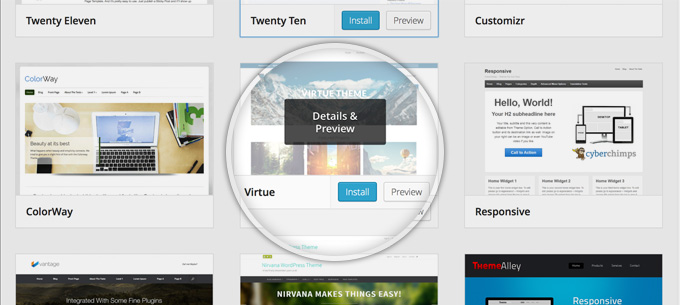
You will now see all themes that meet your search. Hover over any of them and you will see two options – to see a demo of the theme or to install it. Once you choose which theme you want to use for your site, press the blue Install button.

wordpresstheme4


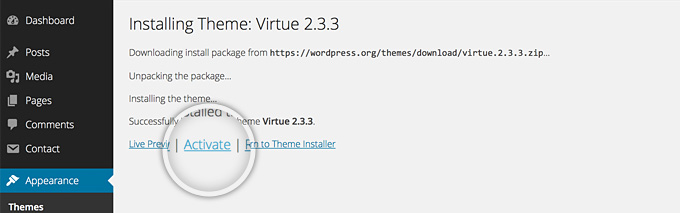
Your WordPress application will download and install the theme for you. Simply click the Acticate link on the next page you will be redirected to.

wordpresstheme5


Upload a theme you have already downloaded

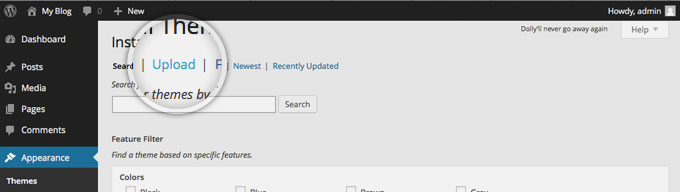
If you have a theme that’s not listed in the WordPress.org directory, you can simply upload it from the Themes -> Install Themes section in WordPress. To do this click on the Upload link at the top of the page.

wordpresstheme6


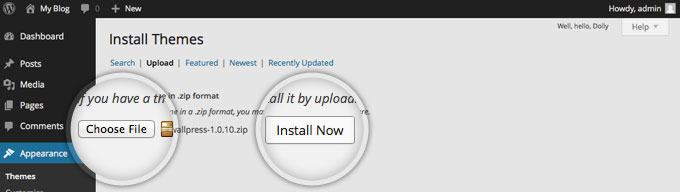
Now, click the Choose File button, select the archive of your theme from your local computer and press the Install Now button.

wordpresstheme7


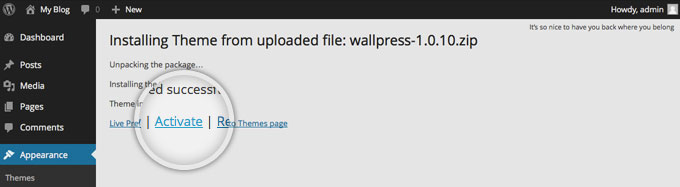
In few seconds, WordPress will upload and extract the theme archive for you. All you need to do next is to press the Activate link under the message for successful theme installation.

wordpresstheme8


If anyone has doubts on this topic then please do let me know by leaving comments or send me an email.
Most Frequently Asked Questions by WordPress Beginners

Good morning to all,
Web development using wordpress content management system is very useful for developers to customize your site easily. In here all the levelof questions for beginners and advanced developers described.
In this article, we will share most frequently asked questions by WordPress Beginners with answers.


Question 1: What is wordpress?

Answer: Worpress is a open source content management system. It’s also free of cost. It is built on PHP/MySQL (which is again Open Source) and licensed under GPL.

Question 2: How safe is website on WordPress?

Answer: The website is safe, protect your site from unwanted resources or hackes. Keep updating the latest version of WordPress to avoid hacking.


Question 3: Are there any limitations to a WordPress web site?

Answer: I think there is no limitations reported yet. You can use WordPress for membership sites, e-commerce sites, photo galleries and any other type of site you can think of.
The web site is created using the same html code as any other site so there are no limitations there either.


Question 4: What are the positive aspects of wordpress?

Answer:Few positive aspects of wordpress are:

  • In-built SEO engine
  • Easy installation and upgrade
  • Flexibility


  • Easy theme system
  • Multilingual- available in more than 70 languages
  • Flexibility and Easy publishing option
  • Own data- no unwanted advert on your website

Question 5: What are the rules that you have to follow for wordpress plugin development?

Answer: List below some basic rules for developing wordpress plugins. They are:

  • Create a unique name
  • Create the plugin’s folder
  • Create a sub-folder for PHP files, translations and assets
  • Create the main plug-in file and fill in header information


  • Create activation and de-activation functions
  • Create an uninstall script
  • Create a readme.txt file
  • To detect paths to plugin file use proper constants and functions

Question 6: I don’t see the Plugins Menu in my Admin Panel

Answer: If your blog is hosted on the free WordPress.com platform, you do not have the ability to add plugins.
If you do not have administrator level account on your WordPress installation, then you will not see the Plugins tab. These are the reason the plugins menu is not visible in wordpress admin panel.


Question 7: How to speed up site loads?

Answer: First thing you need to do is consider adding a caching plugin to WordPress. We use and recommend W3 Total Cache. Another thing you can do is use a Content Delivery Network provider. We use and recommend MaxCDN (See our infographic about What is a CDN and Why you need it). You should also consider using a better web hosting provider. Shared hosts are usually slower.
If you are receiving a lot of traffic, then you should consider moving to a VPS or a Dedicated server.


Question 8: How can I setup Email Subscription- wordpress Blog?

Answer: using FeedBurner or MailChimp

Question 9: How to Create a Contact Form in WordPress?

Answer: Free plugin called Contact Form 7 which is great for most basic contact forms.


If anyone has doubts on this topic then please do let me know by leaving comments or send me an email.